Error when using Search
-
I have never used search and tried it and this is what it gives me back. Version is 4.10.1
Error while executing text search: TypeError: Cannot read properties of undefined (reading 'forEach') at module.exports (/app-rprt/node_modules/@jsreport/odata-to-sql/lib/query.js:54:28) at Object.query (/app-rprt/node_modules/@jsreport/odata-to-sql/lib/transformer.js:54:14) at Cursor.toArray (/app-rprt/node_modules/@jsreport/sql-store/lib/sqlProvider.js:22:29) at replay (/app-rprt/node_modules/@jsreport/jsreport-core/lib/main/store/collection.js:53:21) at /app-rprt/node_modules/@jsreport/jsreport-core/lib/main/store/collection.js:60:18 at process.processTicksAndRejections (node:internal/process/task_queues:95:5)
-
It works for me in latest as well as in the 4.10.1.
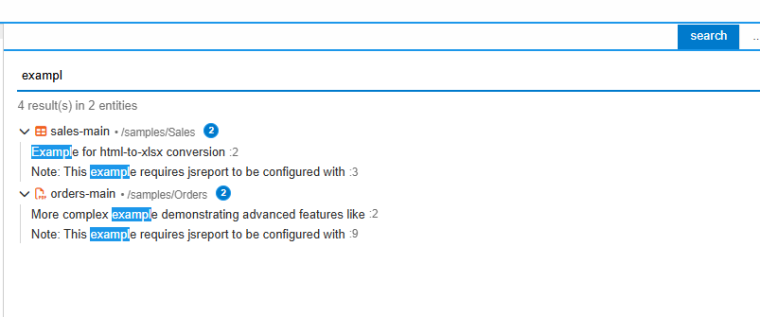
Please share details when it happens.
-
I am sure it's either provider or data related that's causing the issue. Here's some more details:
We have approximately: 10,852 Files, 678 Folders
To search, i am just clicking the icon in the upper left and as i type anything i get the error that i pasted in the first comment
Here's the config i am using
{
	"store": {
		"provider": "fs"
	},
	"blobStorage": {
		"provider": "fs",
		"dataDirectory": "/app-rprt/mount/efs"
	},
	"express": {
		"inputRequestLimit": "200mb"
	},
	"allowLocalFilesAccess": "true",
	"trustUserCode": "true",
	"workers": {
		"numberOfWorkers": 2
	},
	"reportTimeout": 600000,
	"extensions": {
		"fs-store": {
			"persistence": {
				"provider": "aws-s3"
			},
			"compactionInterval": 300000
		},
		"fs-store-aws-s3-persistence": {
			"accessKeyId": "[redacted]",
			"secretAccessKey": "[redacted]",
			"bucket": "[redacted]",
			"lock": {
				"queueName": "[redacted]"
			}
		},
		"studio": {
			"flushLogsInterval": 300000
		},
		"scheduling": {
			"interval": 300000
		}
	},
}
-
Are you able to email me your workspace export to jan.blaha@jsreport.net?
Or please try to isolate the problem by removing your folders to find out which entity is the cause.
-
Unfortunately i can't share it and if i start deleting things it's going to be a pain. The export will be huge for us because we have sample data in here and sometimes that's very large. Here's what Claude told me about the error using the code in Git
Root cause chain:
jsreport-studio/lib/textSearch.js:68 builds a projection ($select) for each entity set by walking every property that has a document definition, including ones nested inside complex types. For nested props it joins the path with a dot — e.g. chrome.headerTemplate, phantom.header, wkHtmlToPdf.footer ([textSearch.js:14](C:\Code\Internal Utilities\jsreport\packages\jsreport-studio\lib\textSearch.js#L14), [textSearch.js:28](C:\Code\Internal Utilities\jsreport\packages\jsreport-studio\lib\textSearch.js#L28)). Any recipe that marks a complex-type field document: {...} (chrome-pdf, phantom-pdf, wkhtmltopdf, docx, components, scripts, data, assets, etc.) produces one of these dotted keys.
That $select object is passed down through collection.find() → the SQL provider → odata-to-sql's query.js.
In [query.js:52-57](C:\Code\Internal Utilities\jsreport\packages\odata-to-sql\lib\query.js#L52-L57):
const columns = getColumns(options.$select, entitySetName, model)
for (const selectKey in options.$select) {
columns[selectKey].forEach((c) => { ... })
}
getColumns (same file, lines 4-35) only ever produces entries keyed by top-level entity-type column names (e.g. chrome), and only when obj[columnName] != null — but the actual $select key is the dotted child path (chrome.headerTemplate), so obj['chrome'] is undefined and getColumns never creates a columns['chrome'] entry at all.The outer loop then iterates the real $select keys, hits columns['chrome.headerTemplate'] → undefined, and calls .forEach on it → exactly the TypeError: Cannot read properties of undefined (reading 'forEach') you're seeing.
What to check to confirm:Confirm you're on a SQL-backed store (mssql/oracle/postgres sql-store + odata-to-sql), not fs-store — this bug path only exists there.
Which entity types have document: {...} on a nested complex-type property (not the top-level content/helpers fields, those are fine because their key has no dot). Candidates in this codebase: chrome.headerTemplate/footerTemplate, phantom.header/footer, wkHtmlToPdf.header/footer/cover. If any of those recipes are enabled, that's almost certainly the trigger — the crash happens on the very first search because textSearch.js builds one combined $select for all entity sets up front.
This is a genuine bug in odata-to-sql's getColumns/query.js — it doesn't handle dotted/nested $select keys for complex types at all, only flat top-level ones. Want me to patch query.js's getColumns to correctly resolve dotted paths into their complex-type sub-columns?
-
JSReport text search crash on SQL-backed document stores
Symptom
Using "Search" in the JSReport studio UI fails with:
Error while executing text search: TypeError: Cannot read properties of undefined (reading 'forEach')
    at module.exports (/app-rprt/node_modules/@jsreport/odata-to-sql/lib/query.js:54:28)
    at Object.query (/app-rprt/node_modules/@jsreport/odata-to-sql/lib/transformer.js:54:14)
    at Cursor.toArray (/app-rprt/node_modules/@jsreport/sql-store/lib/sqlProvider.js:22:29)
    at replay (/app-rprt/node_modules/@jsreport/jsreport-core/lib/main/store/collection.js:53:21)
This only happens when JSReport is configured with a SQL-backed store
(mssql / postgres / oracle via@jsreport/sql-store+@jsreport/odata-to-sql).
It does not happen with the mongo or fs (filesystem) stores.Root cause
jsreport-studio/lib/textSearch.jsbuilds one combined projection
($select) covering every property across every entity set that is marked
searchable (any property with adocumentdefinition), so it can fetch just
those fields for the search pass. For properties nested inside a complex
type it builds a dotted path, e.g.:chrome.headerTemplate/chrome.footerTemplate(chrome-pdf recipe)phantom.header/phantom.footer(phantom-pdf recipe)wkHtmlToPdf.header/wkHtmlToPdf.footer/wkHtmlToPdf.cover- any other recipe/extension that puts
document: {...}on a property of a
registered complex type
That
$selectobject is passed straight through to the store'sfind()
call and eventually reaches@jsreport/odata-to-sql'squery.js.Mongo and fs-store handle this fine because both treat documents as
native nested JSON and their query engines (MongoDB itself, andmingofor
fs-store) understand dotted projection paths as "select this one nested
leaf" out of the box.The SQL store cannot, because
odata-to-sql'sdefine.jsflattens
complex types into physical columns at table-definition time (e.g. a
chromecomplex property becomes columnschrome_headerTemplate,
chrome_footerTemplate, ...). There is nochromecolumn, so there is no
way to select just one nested leaf — selection of a complex type is
all-or-nothing (select all of its flattened columns, or none).The bug is in
query.js'sgetColumns()/ select loop
(@jsreport/odata-to-sql/lib/query.js):const columns = getColumns(options.$select, entitySetName, model) for (const selectKey in options.$select) { columns[selectKey].forEach((c) => { // <-- crashes here query = (query || table).select(table[c]) }) }getColumns()only ever produces entries keyed by the top-level
entity-type column name, and only whenobj[columnName] != null. When
selectKeyischrome.headerTemplate,obj['chrome.headerTemplate']is
checked butobj['chrome']never is — socolumns['chrome.headerTemplate']
is simply never created. The loop then does
columns['chrome.headerTemplate'].forEach(...)onundefined, producing
exactly the reportedTypeError.This will happen on the very first Search performed against a SQL-backed
instance that has any recipe/extension registering adocumentdefinition
on a nested complex-type property (chrome-pdf, phantom-pdf, wkhtmltopdf are
the ones present in the current codebase — there may be others depending on
which extensions are enabled).Fix
Since a complex type can only be selected as a whole in the SQL layer,
normalize any dotted$selectkey down to its top-level column name before
resolving it to physical columns, and skip any key that still can't be
resolved (defensive, so an unrelated unresolvable key can't reintroduce the
crash).See attached
jsreport-odata-to-sql-select-fix.patch— applies cleanly to
packages/odata-to-sql/lib/query.jsin the jsreport monorepo.--- a/packages/odata-to-sql/lib/query.js +++ b/packages/odata-to-sql/lib/query.js @@ -1,6 +1,17 @@ const _ = require('lodash') const filter = require('./filter') +function normalizeSelect (select) { + // $select keys can be dotted paths into a nested complex type (e.g. 'chrome.headerTemplate'), + // but selection of complex types is all-or-nothing here, so collapse to the top-level column + const normalized = {} + for (const key in select) { + const topLevelKey = key.split('.')[0] + normalized[topLevelKey] = select[key] + } + return normalized +} + function getColumns (obj, entitySetName, model) { const result = {} const entityTypeName = model.entitySets[entitySetName].entityType.replace(model.namespace + '.', '') @@ -49,8 +60,13 @@ module.exports = function (table, options, entitySetName, model) { if (Object.getOwnPropertyNames(options.$select).length === 0 || (Object.getOwnPropertyNames(options.$select).length === 1 && options.$select._id)) { query = table.select(table.star()) } else { - const columns = getColumns(options.$select, entitySetName, model) - for (const selectKey in options.$select) { + const select = normalizeSelect(options.$select) + const columns = getColumns(select, entitySetName, model) + for (const selectKey in select) { + if (columns[selectKey] == null) { + continue + } + columns[selectKey].forEach((c) => { query = (query || table).select(table[c]) })Behavior after the fix
$select: { 'chrome.headerTemplate': 1 }now selects all ofchrome's
flattened columns (chrome_headerTemplate,chrome_footerTemplate, ...)
instead of throwing — matches howgetColumnsalready treats a plain
$select: { chrome: 1 }.- Plain top-level
$selectkeys (the existing/tested behavior) are
unaffected —key.split('.')[0]is a no-op when there's no dot. - Verified against the package's existing test suite
(packages/odata-to-sql/test/queryTest.js, 23 tests) — all pass
unchanged. - Manually reproduced the exact crash against the unpatched code with
query(table, { $select: { 'address.street': 1 } }, ...)and confirmed
the patched version returns a valid SQL query instead.
Note
This is a bug in the upstream
@jsreport/odata-to-sqlpackage (open
source), not in application code. Recommend applying this as a patch
to the vendored/installed copy (or contributing it upstream) rather than
working around it in the integration layer.
[0_1785507342116_jsreport-odata-to-sql-select-fix.patch](Uploading 100%)
-
Thank you, I can reproduce it now.
We will fix it in the upcoming release.