Hi! @bjrmatos,
Following up on the issue I shared earlier. Just wanted to check if you had a chance to look into it.
Appreciate your help!
A
andribo
@andribo
0
Reputation
12
Posts
2603
Profile views
0
Followers
0
Following
Posts made by andribo
-
RE: Conditional section break for landscape pageposted in general forum
-
RE: Conditional section break for landscape pageposted in general forum
Hi @bjrmatos,
Here's a simple template to reproduce the issue: https://playground.jsreport.net/w/anon/_x2Y2DRG
The expected behavior is that each chapter appears on a separate page, which works correctly in jsReport v4.9 and earlier versions.
However, starting from jsReport v4.10.0, section breaks are ignored, causing all chapters to be rendered on a single page.
-
RE: Conditional section break for landscape pageposted in general forum
Hi @bjrmatos
Could you let me know where I can find more details about the changes related to the section break? I'm asking because we encountered the opposite situation: our template works correctly with JSReport v4.9, but all later versions produce incorrect results when conditionally rendering a section break.
-
Table border issue in the Html-to-xlsx recipeposted in general forum
Hi everyone,
After upgrading JSReport from version 4.7 to 4.8, we encountered an issue with table borders when using the
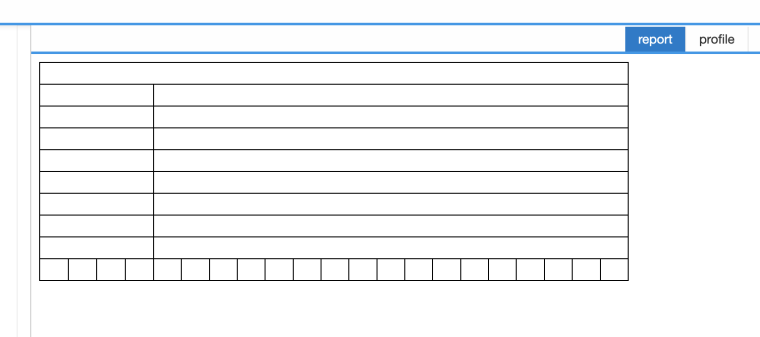
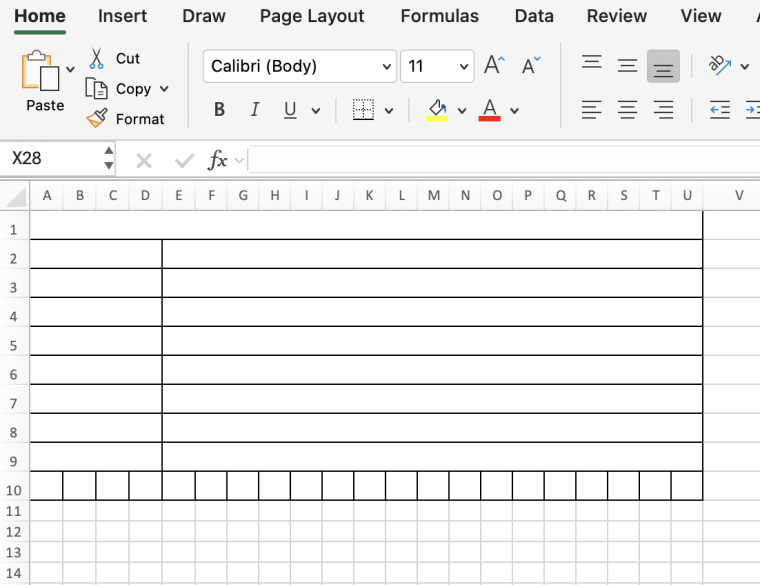
html-to-xlsxrecipe. Here's a minimal reproducible example: https://playground.jsreport.net/w/andribo/_CUkL33T. It works correctly in the playground because it runs on JSReport 4.7.The issue may be related to how the recipe handles cells with the colspan attribute.
Here's the result when using the
htmlrecipe:
Here’s the output of the
html-to-xlsxrecipe in version 4.7:
However, in version 4.8, the result looks like this:
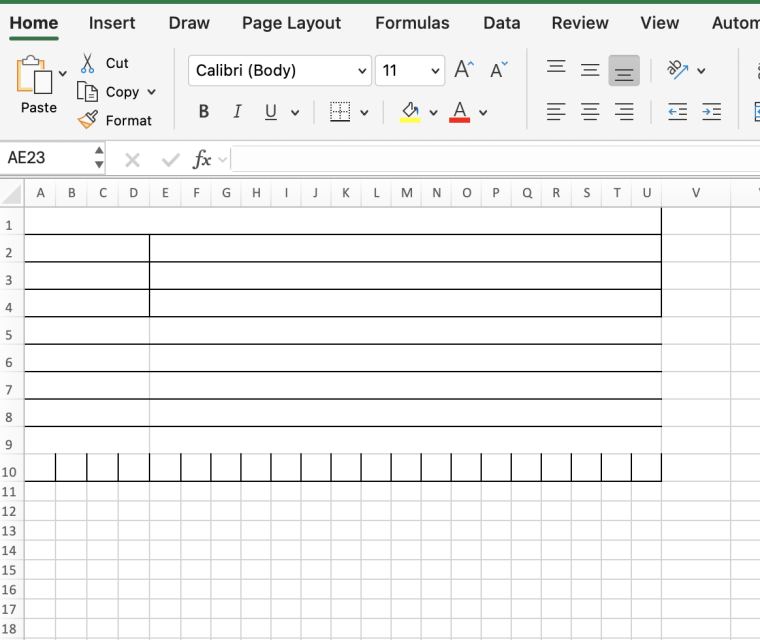
As you can see, some table borders are missing in the output.
-
RE: Issue with Memory Consumption and OOM Errors When Using docxImage with Base64 Imagesposted in general forum
Thank you, guys! The ability to provide a custom loader function fully meets our needs and resolves the OOM issues we were facing.
-
RE: Issue with Memory Consumption and OOM Errors When Using docxImage with Base64 Imagesposted in general forum
Hi Jan, thanks for creating a ticket for that! I noticed that the same issue is occurring in the
docxHtmlhelper - would you be able to look into improving image loading there as well?Also, do you have an estimated timeframe for when this might be picked up?
-
Issue with Memory Consumption and OOM Errors When Using docxImage with Base64 Imagesposted in general forum
Hello,
We are implementing a Word report using the
docxrecipe and encountered issues when inserting multiple images into the report.Issue Description
To include images, we use thedocxImagehelper, providing thesrcas a base64 data URL. In thebeforeRenderscript, images are prefetched to handle authentication properly and then passed todocxImage.However, this approach leads to high memory consumption, often resulting in an Out of Memory (OOM) error when processing larger images or multiple images at once.
At the same time, when images are provided as direct URLs - allowing
docxImageto handle the loading - everything works fine.Reproduction
We have created a minimal example to reproduce the issue: https://playground.jsreport.net/w/anon/CVpIkxye (See README for details).Possible Cause & Suggested Solution
From what I see,axiosis responsible for loading images inside thedocxImagehelper, specifically in this line:
https://github.com/jsreport/jsreport/blob/master/packages/jsreport-docx/lib/imageUtils.js#L32We would like to know if there’s a way to provide custom options to this axios request. In our case, we need to:
-
Set an
Authorizationheader for authenticated requests -
Adjust
httpsAgentsettings to support self-signed certificates
I initially tried setting
axiosdefaults within the report script, but I suspect thatdocxImageand report scripts run in separate contexts, so this approach didn't work.Request for Support
Is there a recommended way to handle this? Any advice on working around the OOM issue or configuringaxiosinsidedocxImagewould be greatly appreciated.Thanks in advance!
-
-
RE: Undocumented property of the "docxImage" helperposted in general forum
Thank you, @bjrmatos!
It turns out passing a promise was an unintentional mistake, though fortunately, it didn’t cause any issues. :)
In our setup, we prefetch images in the
beforeRenderscript, convert them into base64 data URIs, and pass these images to the data. Recently, we introduced an asynchronous image resizer into this process but didn’t handle its output correctly.Since you mentioned that using a promise with a URL as the "src" is expected behavior, I think we can keep our current implementation as is.
I do have one additional question: when adding promise-based properties to the template’s "data", are there any limitations on what can be passed? Specifically, does the data need to be JSON-serializable, or can it include any JavaScript variable?
-
Undocumented property of the "docxImage" helperposted in general forum
Hello,
According to the documentation, the "src" property of the
docxImagemust be "the base64 dataURI string representation of the image to load or an url from which to fetch the image".
However, it turns out, that it can also be a promise fulfilled with the base64 data URI string. I suppose this is due to using the
waitForAsyncHelperinside thedocxImage.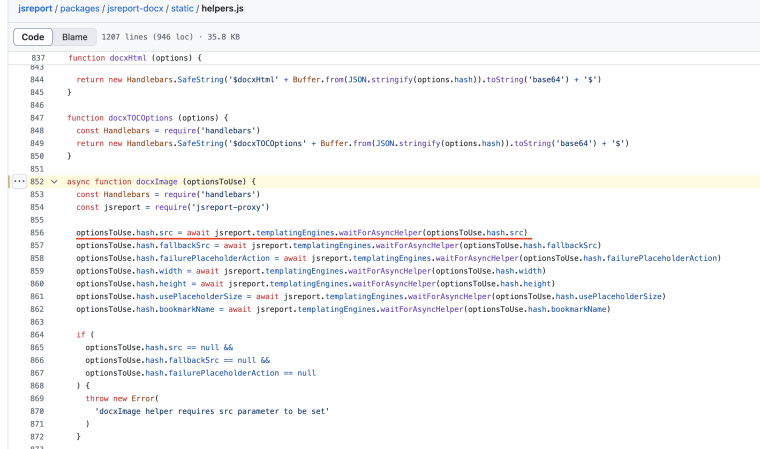
Would it be reasonable to rely on this feature of the 'src' property, or is it better to strictly follow the documentation and provide a string value?
-
RE: Add indentation to a cell content using html-to-xlsx recipeposted in general forum
That's a shame ((
Thanks, @jan_blaha for a reply.