You're right, I'm not able to reproduce the "just =B2 in cell A3, I'm only getting an issue with a more complex formula like =C2+B2
J
Posts made by jsnevely-tempest
-
RE: xlsx - Formulas with References to the Right Break in 4.11posted in general forum
-
xlsx - Formulas with References to the Right Break in 4.11posted in general forum
We've noticed a bug that appears to have been introduced in 4.11 with the xlsx recipe. This was only happening with a very complex excel file with multiple formulas that reference prior formulas etc... However, I was able to reproduce this locally by switching between 4.11.0 and 4.10.1 locally. A working example (in the 4.7 playground) can be found here.
This is essentially what I was able to boil this down to, once you have a formula on a subsequent row (below) that references a calculated field of any type to the right of that cell the report will not render. It seems like it's probably stuck in a loop, though I haven't seen a massive spike in resources when testing this.

I've even tested putting the formula
=B2in the cellA3and that causes this issue, so perhaps that's the simplest form, but if you were to run the template + excel file on 4.11.1 from the linked playground you should see that the profiler never gets past theStarting child request to render xlsx dynamic parts for generation stepstep.We've had to revert back to 4.10.1 for our next release, but I wanted to bring this to your attention.
-
RE: Component Evaluation Hookposted in general forum
Thanks for the follow-up, I like that idea because this way I wouldn't be polluting the default behavior of existing reports with components already. I'll try this approach for sure!
-
Component Evaluation Hookposted in general forum
Hello,
I'm working on an in-house extension that would allow us to "hot swap" components of a report based on incoming context, i.e. one client might have a custom version of a component for a specific report stored elsewhere (not just the fs-store).
I've got a working version right now where I'm using the
beforeRenderListenershook to make the content swap on disk using thedocumentStore.updatefunction and then reverting it back in theafterRenderListenershook if an update was made.This approach works, but I don't like the idea of modifying the component temporarily even if it is for a short period of time. Is there a hook I'm missing which could be attached to the Component Evaluation event? I've been through the
jsreport-componentscode pretty thoroughly but I don't see how the evaluate call used by the proxy would trigger anything, but hopefully I'm missing something?If this isn't present is it something that would make sense on the roadmap? Ideally I would be able to intercept a pre-render of a component and modify the
reqon that specific call if needed and leave thedocumentStorealone. Alternatively I suppose we could use child reports but that feels like a lot of extra overhead compared to just dynamic components. -
RE: html-to-xlsx tables with merged cells missing last rowposted in general forum
@bjrmatos just checking in on this issue, I noticed a new release of 4.10.0 yesterday and in my testing locally (using the code posted at this original sandbox link) I get the "Cannot read properties of undefined (reading 'styles')" error from the html-to-xlsx recipe.
I know how releases go, and how complex the html-to-xlsx merging is, so no rush still just wanted to re-open this topic as I know you've been spending time on that section of the codebase.
Thanks!
-
html-to-xlsx tables with merged cells missing last rowposted in general forum
Hello,
All the work that's been done on the html-to-xlsx recipe has been great thanks for continuing to add to that one!
I've found another odd edge case where the final row of a set of merged rows and columns will be lost. See the two playground examples here
As before the code is the same between the two, one is just set to the html recipe and the other is using html-to-xlsx. On the html-to-xlsx version you can see that the final row where all the
Sub 1.1.3.1.AthroughSub 1.1.3.1.Dvalues are missing.My use case here is entirely dynamic where the output of complex JSON arrays that vary from request to request are mapped into a structure which create the HTML table rows using row-span and col-span so I can't "prevent" this structure necessarily, it's just one where I noticed the issue during testing. This particular structure is actually the header rows so is unusual in that sense, though still valid in my opinion.
Thanks again for your help and consideration!
-
Merged Cells in HTML-XLSX dropping contentposted in general forum
I've created a playground workspace to view this issue here
Basically within a table using rowspan to merge cells, one single cell in the example's content is not displaying when converting to excel. This appears to be an issue if there are cells to the right of the cell in question which have had a row span beyond it.
In the workspace linked above there are two identical files, an HTML one and an HTML-XLSX one. In the HTML version (Merged Table HTML), you can see in the first table the central "3 - two" cell is visible and highlighted in red. However when you execute the html-excel version of the same code the cell is rendered
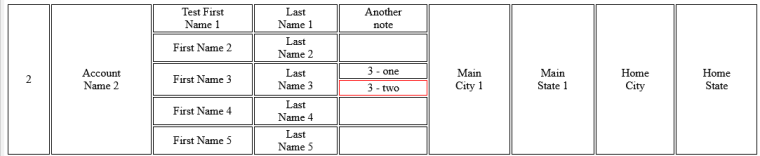
However, once you run the html-xlsx template (Merged Table HTML-Excel) you will see that the content for that cell is empty and the highlighting is not where you would expect it.
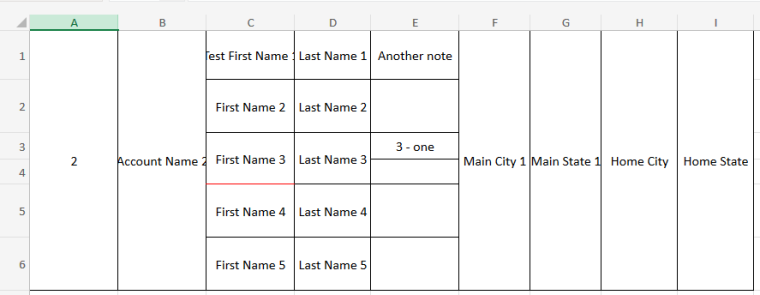
In experimenting I've found that by moving the additional 4
rowspan=6columns from the right of the cell in question to the left of them the content does appear in excel, however; 1. this isn't an option as I'm constructing these tables dynamically and 2. the highlighting of the cell is still not as expected so I suspect this is a pseudo workaround that isn't actually working, but appears that it does only in this simple example. I've added a second table to each file to demonstrate this.I've tried a number of things, adding empty space cells using
adding and removingrowspan=1to rows by default etc... I'm not an expert in HTML tables by any means so the issue could entirely be on my side so I appreciate that you might look into this at all. -
MouseUp in Studio vs MouseDown (Firefox)posted in general forum
This appears to only be in Firefox...
In jsreport studio, a mouse up event selects an object in the object pane, rather than mouse down.
Steps to Reproduce:
- Open JS Report Playground in Firefox (version 129.0.1 on Windows 11)
- Select any text in body of Invoice Template
- While holding mouse down, hover over data in the object pane
- Release Mouse
- data file will open
This can be extremely frustrating when working on a project where the object pane is full, basically any time you do a quick selection of text in the edit pane, another file opens. This could be a Firefox specific behavior that can't be changed but I'm hoping you can specify the behavior of the object pane on the left to only open on click rather than mouse up
Thanks!
-
calcChain.xml repaired when multiple formulas on templateposted in general forum
See this playground. These are the same data and same template. The first only has a single SUBTOTAL formula below the data and runs fine.
However when the second is run the calculations do not run and the workbook is reported as repaired with an error :
Removed Records: Shared formula from /xl/worksheets/sheet1.xml part
Removed Records: Formula from /xl/calcChain.xml part (Calculation properties)