xlsx - Formulas with References to the Right Break in 4.11
-
We've noticed a bug that appears to have been introduced in 4.11 with the xlsx recipe. This was only happening with a very complex excel file with multiple formulas that reference prior formulas etc... However, I was able to reproduce this locally by switching between 4.11.0 and 4.10.1 locally. A working example (in the 4.7 playground) can be found here.
This is essentially what I was able to boil this down to, once you have a formula on a subsequent row (below) that references a calculated field of any type to the right of that cell the report will not render. It seems like it's probably stuck in a loop, though I haven't seen a massive spike in resources when testing this.

I've even tested putting the formula
=B2in the cellA3and that causes this issue, so perhaps that's the simplest form, but if you were to run the template + excel file on 4.11.1 from the linked playground you should see that the profiler never gets past theStarting child request to render xlsx dynamic parts for generation stepstep.We've had to revert back to 4.10.1 for our next release, but I wanted to bring this to your attention.
-
thank you for the replication, i am going to take a look at the problem.
-
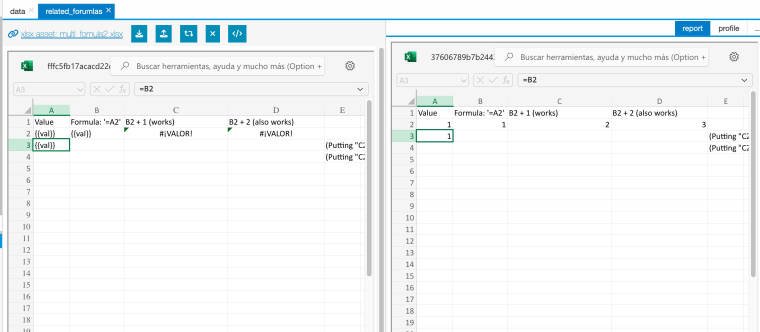
I've even tested putting the formula =B2 in the cell A3 and that causes this issue, so perhaps that's the simplest form
do you mean this? for me, it works
-
You're right, I'm not able to reproduce the "just
=B2in cellA3, I'm only getting an issue with a more complex formula like=C2+B2
-
got it, FYI this is now fixed on master branch, it will be part of next release