Issue with xlsx recipe
-
Hello,
I have an Excel report where I use a data table and in the header I put a placeholder which contains the call to a function which is defined in the helper of the report itself.
Up to version 4.10, that worked perfectly, sinche the function call returned a string, and that string appeared in the table header as expected.
Now I am using versione 4.13 and whenever I try to launch this report, it produces a corrupted file, which Excel has to repair before opening it, while if I try to run the report from the jsReport studio, it does not manage to produce a valid Excel file.
I have tried to act in the template by using xlsxReplace to replace the value on the fly before rendering, but this does not work. It does not work either if I try to put the value in the shared strings replacing the fixed string value I put in the Excel template.Any clue?
Thanks
-
I have an Excel report where I use a data table and in the header I put a placeholder which contains the call to a function which is defined in the helper of the report itself.
Up to version 4.10, that worked perfectly, sinche the function call returned a string, and that string appeared in the table header as expected.
Now I am using versione 4.13 and whenever I try to launch this report, it produces a corrupted file, which Excel has to repair before opening it, while if I try to run the report from the jsReport studio, it does not manage to produce a valid Excel file.if you have a template that worked fine in 4.10 but broke in 4.13 please share the full template so we can fix it.
I have tried to act in the template by using xlsxReplace to replace the value on the fly before rendering, but this does not work. It does not work either if I try to put the value in the shared strings replacing the fixed string value I put in the Excel template.
was this part of the original template in 4.10? or is it a workaround for your template in 4.13?
if this is just a workaround for 4.13, lets focus on fixing the original template so you dont need this.
-
Hello, please find attached the zip that contains the report template which I exported from my jsReport ambient. Hope this helps. Thanks. [0_1779867537881_export (11).jsrexport](Uploading 100%)
-
@a-pulvirenti_TSGC24 it seems the zip was not uploaded correctly. can you try again?
you can also email me the zip at bjrmatos@gmail.com in case the upload does not work again.
-
@a-pulvirenti_TSGC24 thanks, i have received the email with the zip, i am going to review this soon
-
@a-pulvirenti_TSGC24 it took me longer (i was on vacation), but i am now checking this bug.
it seems your export does not contain some helpers you use, when i try to run the template i get the error that some assets are missing.
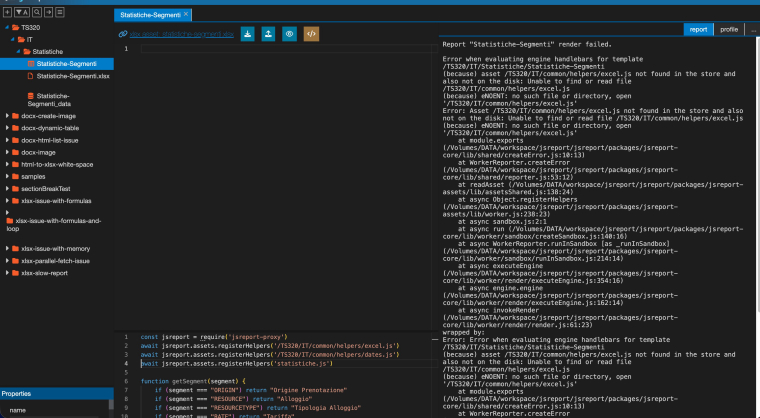
can you share en export with those files included? likely you need to include also the
/TS320/IT/commonfolder, and thestatistiche.jsreferenced in the helpers.thanks.
-
@a-pulvirenti_TSGC24 FYI, this problem is fixed, it will be part of next jsreport release